> For the complete documentation index, see [llms.txt](https://helper.docs.sirdata.net/llms.txt). Markdown versions of documentation pages are available by appending `.md` to page URLs; this page is available as [Markdown](https://helper.docs.sirdata.net/english/sirdata-analytics-helper-1/google-ads-and-other-consequences.md).
# Google Ads and other consequences
The objective of the Sirdata Analytics Helper proxy is to prevent US intelligence services from accessing data or, when not possible, prevent them from identifying individuals based on the obtained data.
Due to targeted access requests, this inevitably involves a pseudonymization step aimed at blocking any linkage based on identification between Analytics data and other data such as Google Ads data.
The unfortunate consequence is the loss of the link between Google Ads and Google Analytics:
* User-centric data transmitted from Google Analytics to Google Ads is no longer available.
* User-centric data transmitted from Google Ads to Google Analytics is no longer available.
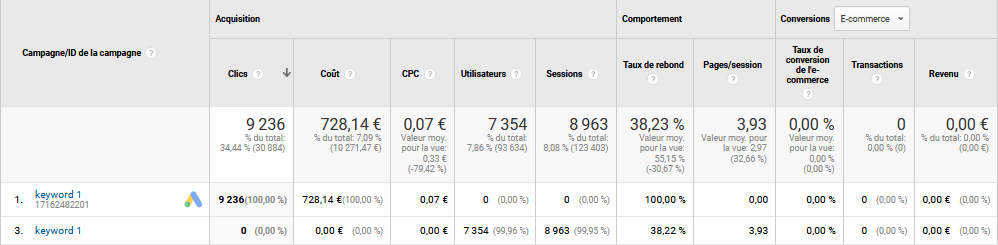
For example, anything tracked in Google Analytics through Google Ads auto-tagging (such as "gclid"...) will no longer be tracked:
* You will still see click and investment information, but there will be no associated sessions
* Similarly, orphaned sessions will no longer be attributed to advertising investments.
If you wish to maintain a correlation between the two, it is necessary to simultaneously activate auto-tagging ("gclid"...) and manual tagging ("UTMs") if you are not transmitting data that allows identification.
For example, if you had this type of statistics on a line thanks to auto-tagging:
Your aggregated reading remains possible by grouping the lines of auto-tagging and manual tagging, by keyword, for example:
You will likely notice in your Google Analytics reports a shift from the source "google/cpc" to "googleads/cpc," which is perfectly normal.
As [explained by Google](https://support.google.com/analytics/answer/1012047), the former corresponds to Google Ads tracking through auto-tagging, while the latter is attributed to manual tagging.